
Download B1 Archiver – File Compression, Archive Tool, B1 Format, ZIP, RAR, 7Z, File Management, Secure Archiving, Multi-format Support, Split Archives, Cross-platform
Overview
B1 Archiver is a free file compression and decompression utility designed to streamline digital file management across multiple platforms. The application enables users to create, extract, and manage archives using a variety of formats, including its proprietary B1 format as well as widely used standards such as ZIP, RAR, and 7Z. Its primary purpose is to simplify the handling of large or numerous files by reducing their size and organizing them efficiently. This makes it particularly useful for users who frequently transfer files via email, back up data, or share content across devices.
Target users include individuals, students, and professionals who need reliable, no-cost tools for managing digital files. The app’s intuitive interface, which closely mirrors the layout of popular archiving software like WinRAR, lowers the learning curve for users transitioning from other platforms. Its cross-platform availability—spanning Android, iOS, Windows, macOS, and Linux—ensures consistent functionality regardless of device or operating system. This broad compatibility enhances its value in a multi-device environment.
B1 Archiver addresses common challenges such as file size limitations during email transmission and the need for secure, organized data storage. By supporting archive splitting with size presets tailored to platforms like Gmail, it directly solves practical limitations in digital communication. The developer, B1 Software, has maintained a focus on accessibility and usability since its initial release in 2013, establishing the app as a dependable tool within the productivity ecosystem. The absence of premium tiers or hidden costs reinforces its position as a trustworthy, user-first solution.
Key Features & Functionality
- Multi-format Support: B1 Archiver can extract and create archives in multiple formats, including ZIP, RAR, 7Z, and its native B1 format. This eliminates the need for additional software when dealing with common archive types, enhancing workflow efficiency.
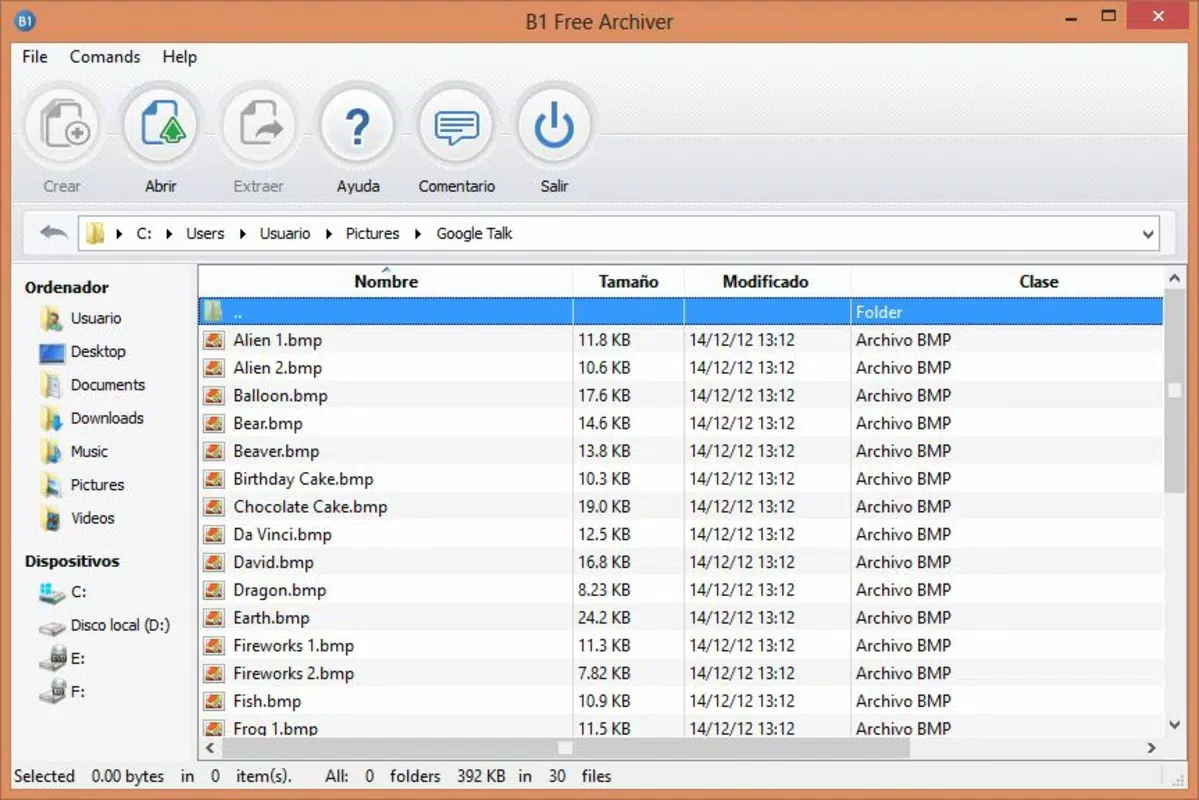
- User-friendly Interface: The app features a clean, top-menu-driven layout for creating and extracting archives, paired with a bottom panel for file browsing. This layout allows users to navigate and manage files with minimal effort, even when handling complex directory structures.
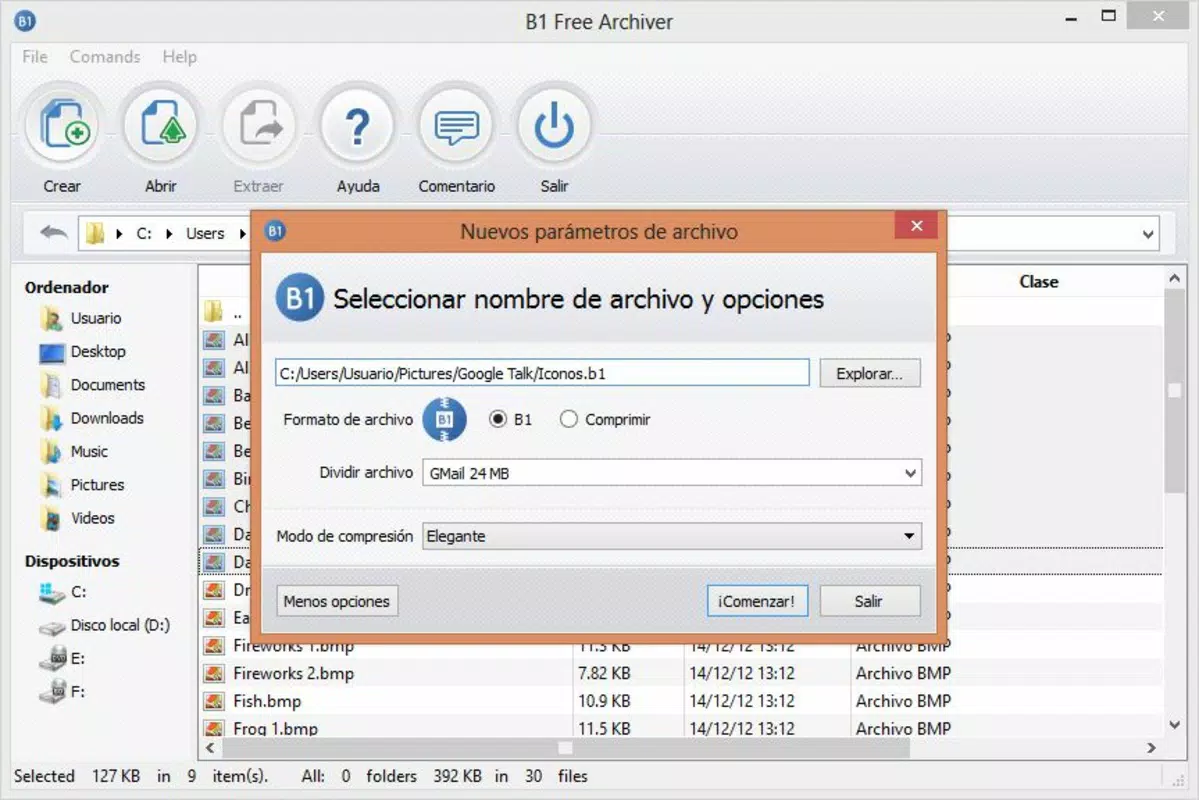
- Archive Splitting Options: When generating archives, users can split them into smaller segments using predefined size limits. This feature is especially helpful for sending large files through email services with size restrictions, such as Gmail, which limits attachments to 25 MB.
- Cross-platform Availability: B1 Archiver is accessible on Android, iOS, Windows, macOS, and Linux, ensuring that users can compress or decompress files regardless of their device. This consistency across platforms supports seamless file sharing and synchronization.
- Completely Free Access: The app is available at no cost with no in-app purchases, subscriptions, or premium features. This makes it an accessible option for users seeking reliable archiving tools without financial commitment.
For example, a student preparing a project with multiple multimedia files can compress them into a single B1 archive, split it into 20 MB chunks for email submission, and later extract them on a different device. Similarly, a remote worker can securely archive sensitive documents using the B1 format and share them across teams without compatibility issues.
Interface, UX & Performance
The user interface of B1 Archiver is designed with simplicity and functionality in mind. The top navigation bar provides quick access to core actions such as creating new archives and extracting existing ones. Below this, a file browsing panel displays the current directory structure, allowing users to select files for compression or extraction with ease. The layout is consistent across platforms, ensuring a familiar experience whether using Android, iOS, or desktop operating systems.
Navigation is intuitive, with clear labels and minimal clutter. Users can browse folders, select multiple files, and apply compression settings without needing advanced technical knowledge. The app maintains responsiveness during file operations, though specific performance metrics were not disclosed by the developer. Although the developer did not list formal performance metrics, the app’s lightweight design—40.2 MB in size—suggests efficient resource usage across a range of devices.
Stability appears to be well-maintained, given the app’s long-standing presence since 2013. Users can expect consistent behavior when handling archive creation and extraction tasks. The interface adapts to different screen sizes, providing a usable experience on both smartphones and tablets. Overall, the UX prioritizes clarity and speed, aligning with modern expectations for productivity tools.
Platform Compatibility & Technical Requirements
B1 Archiver is available on Android, iOS, Windows, macOS, and Linux, offering broad accessibility across major operating systems. This cross-platform support allows users to manage archives regardless of their preferred device. The app is compatible with Android and iOS mobile platforms, enabling file handling on smartphones and tablets.
The current version is 1.5.0, with a file size of 40.2 MB. While the developer did not specify minimum OS requirements, the app’s availability on both mobile and desktop platforms suggests it is optimized for modern devices. The absence of detailed technical specifications means compatibility with older or low-end devices cannot be confirmed. Users are advised to ensure their device meets standard system requirements for the respective platform.
For Android users, the app is available through official app stores. iOS users can access it via the App Store. Desktop versions are distributed directly by the developer. No additional dependencies or permissions were listed, indicating a self-contained installation process.
Pros and Cons
Pros
- Supports multiple archive formats including ZIP, RAR, 7Z, and B1.
- Intuitive interface with familiar navigation for users of WinRAR and similar tools.
- Archive splitting with size presets for email-friendly file sharing.
- Available on Android, iOS, Windows, macOS, and Linux.
- Completely free with no in-app purchases or hidden costs.
Cons
- Specific technical requirements and performance benchmarks were not provided.
- Developer did not disclose compatibility details for older or low-end devices.
- Advanced compression settings or encryption options were not listed.
- Update frequency and future development roadmap were not disclosed.
- No official support channels or user documentation were mentioned.
FAQ
Is B1 Archiver safe to download and use?
B1 Archiver is available through official channels on Android, iOS, and desktop platforms. The developer, B1 Software, has maintained the app since 2013, and no security warnings have been reported. As with any third-party tool, users should download from trusted sources to ensure safety.
Can I extract ZIP and RAR files with B1 Archiver?
Yes, B1 Archiver supports the extraction of files from ZIP, RAR, and 7Z archives without requiring additional software. This functionality is built into the app, making it a versatile tool for handling common archive formats.
Does B1 Archiver support file encryption?
The developer did not provide information about encryption features. While the app supports secure archiving through its B1 format, specific encryption methods or password protection were not detailed in the available documentation.
Is B1 Archiver available for both Android and iOS?
Yes, B1 Archiver is available on both Android and iOS platforms. Users can install the app on smartphones and tablets through their respective app stores.
How often is B1 Archiver updated?
The update frequency was not disclosed by the developer. The current version is 1.5.0, released in 2013. While the app remains functional, the lack of recent update details may indicate infrequent maintenance.
Final Thoughts
B1 Archiver stands out as a reliable, free solution for users seeking a straightforward way to manage digital files across devices. Its multi-format support, intuitive interface, and cross-platform availability make it a practical choice for everyday file compression and decompression tasks. The ability to split archives into manageable parts is especially valuable for users navigating email size limits or sharing files over constrained networks.
While the app lacks detailed technical documentation and advanced features like robust encryption, its core functionality is solid and well-executed. For individuals and teams looking for a no-cost, accessible tool that works seamlessly across platforms, B1 Archiver delivers consistent value. The absence of ads or paywalls further enhances its appeal.
Download B1 Archiver now


